Using COMM_SELF as MPI communicator#
Topic#
In this demo, we investigate a different kind of MPI parallelization, where the MPI communicator COMM_SELF is used instead of the usual COMM_WORLD. This enables us to parallelize a (rather small) problem by solving it multiple times on a single CPU, but with different parameters for each individual solve. To demonstrate this, we use the model problem from Shape Optimization with a Poisson Problem, but use a different right-hand side of the Poisson equation for different MPI processes.
This demo is suited for an arbitrary number of process, but we will only use two different right-hand sides, one for the global process 0 and another for all other processes.
For an overview over MPI, we recommend the website MPI Tutorial as well as the documentation of the Python package mpi4py.
Implementation#
The complete python code can be found in the file demo_mpi_comm_self.py and the
corresponding config can be found in config.ini.
We first import the relevant Python modules.
from fenics import *
import matplotlib.pyplot as plt
from mpi4py import MPI

import cashocs
Note that we import the mpi4py module, whose documentation can be found
here.
MPI Initialization#
Next, we define the communicator we want to use
comm = MPI.COMM_SELF
which is the COMM_SELF communicator. To ensure that each MPI process can write in its own result directory, we also use the global COMM_WORLD communicator to define the different result folders as:
rank = MPI.COMM_WORLD.rank
result_dir = f"./results_rank_{rank}"
Next, we load the default cashocs configuration and set the appropriate result directory for all processes with
config = cashocs.load_config("./config.ini")
config.set("Output", "result_dir", result_dir)
Important
It is necessary to define different result directories for each group of MPI processes if not the default COMM_WORLD communicator is used. Otherwise, the output targets of different groups might be identical, so that the produced files might be unusable or errors could occur.
To get the correct logging behavior from cashocs, we must use the following line if we don’t use the default COMM_WORLD communicator
cashocs.log.set_comm(comm)
Important
If you don’t use the cashocs.log.set_comm() with the same communicator used
to import / create your computational mesh, deadlocks might occur and cashocs won’t be
able to work properly.
To attach a different log file for each MPI process, we can call
cashocs.log.add_logfile(f"./log_rank_{rank}.txt", level=cashocs.log.INFO)
and we refer to Logging with cashocs for more details on using log files with cashocs.
Now, we can load the computational mesh with the line
mesh, subdomains, boundaries, dx, ds, dS = cashocs.import_mesh(
    "./mesh/mesh.xdmf", comm=comm
)
where we have to supply the MPI communicator as keyword argument.
Defining the PDE Problem#
Finally, we can continue as in Shape Optimization with a Poisson Problem until we implement the right-hand side \(f\) of the problem:
V = FunctionSpace(mesh, "CG", 1)
u = Function(V)
p = Function(V)

x = SpatialCoordinate(mesh)
Now, let us use two different right-hand sides for the problem, differentiating them by the global rank with the COMM_WORLD communicator:
if MPI.COMM_WORLD.rank == 0:
    f = 2.5 * pow(x[0] + 0.4 - pow(x[1], 2), 2) + pow(x[0], 2) + pow(x[1], 2) - 1
else:
    f = 3.5 * pow(x[1] + 0.6 - pow(x[0], 2), 2) + pow(x[0], 2) + pow(x[1], 2) - 1
Afterwards, everything is identical to Shape Optimization with a Poisson Problem:
e = inner(grad(u), grad(p)) * dx - f * p * dx
bcs = DirichletBC(V, Constant(0), boundaries, 1)

J = cashocs.IntegralFunctional(u * dx)

sop = cashocs.ShapeOptimizationProblem(e, bcs, J, u, p, boundaries, config=config)
sop.solve(algorithm="bfgs")
Note
To run this demo (in parallel), we have to use the command
mpirun -n 2 python demo_mpi_comm_self.py
where the option -n 2 specifies that we want to use two MPI tasks to run the
problem.
Results#
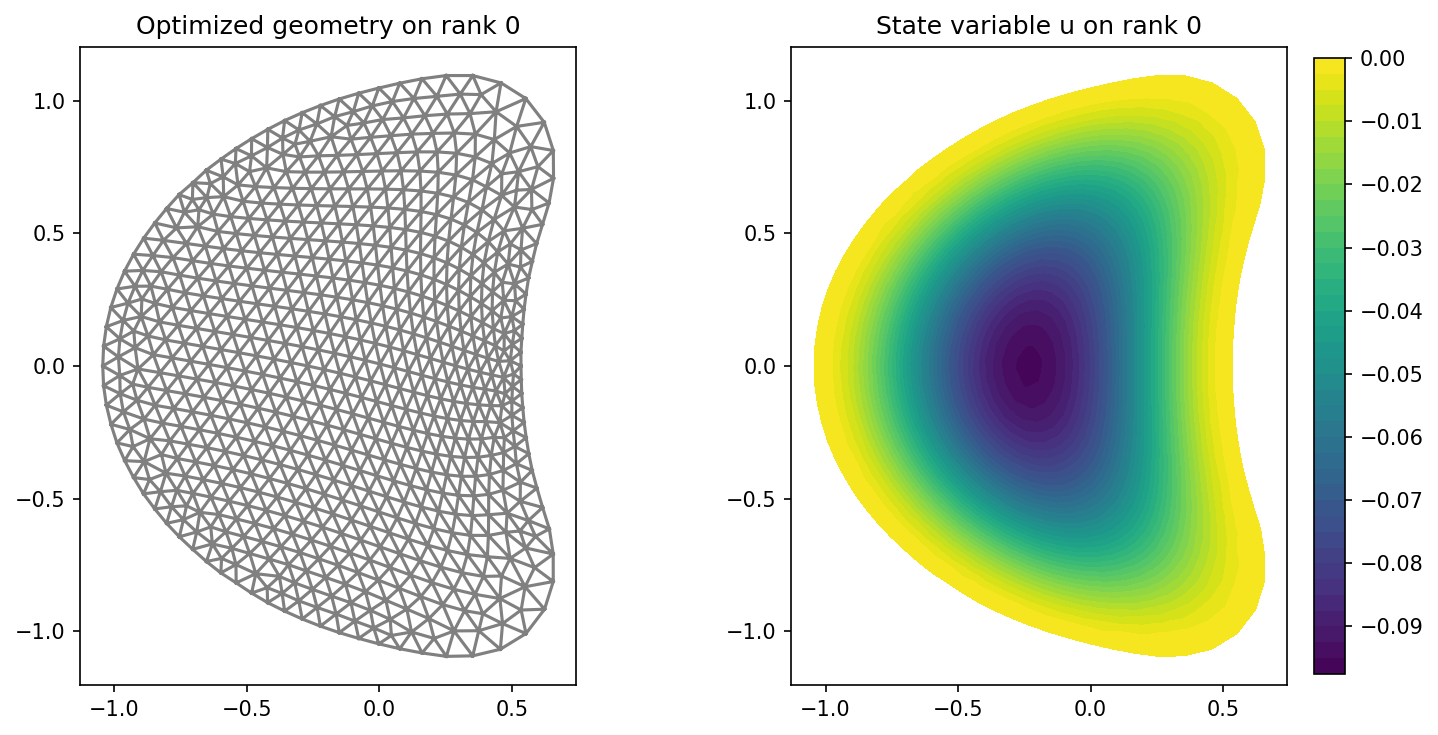
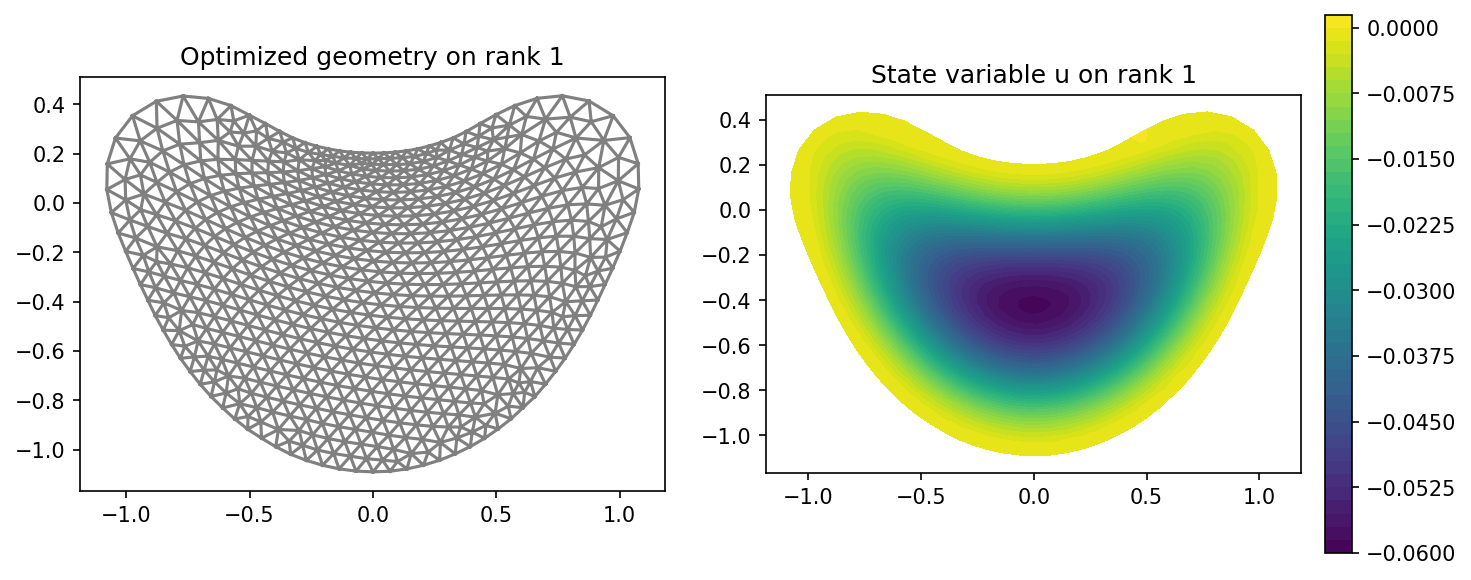
From the output we observe that we, indeed, solve two different problems with different right-hand sides. Additionally, we can see in the two produced log files that each MPI process did, in fact, do different things.
The results are visualized in the following with matplotlib:
plt.figure(figsize=(10, 5))
ax_mesh = plt.subplot(1, 2, 1)
fig_mesh = plot(mesh)
plt.title(f"Optimized geometry on rank {rank}")

ax_u = plt.subplot(1, 2, 2)
ax_u.set_xlim(ax_mesh.get_xlim())
ax_u.set_ylim(ax_mesh.get_ylim())
fig_u = plot(u)
plt.colorbar(fig_u, fraction=0.046, pad=0.04)
plt.title(f"State variable u on rank {rank}")

plt.tight_layout()
# plt.savefig(f"./img_rank_{rank}.png", dpi=150, bbox_inches="tight")
and the result should look like this